
How to Prevent Speaker Time Overruns

When speakers run over, everything shifts. The next presenter gets squeezed, breaks disappear, and attendees grow frustrated. A few simple practices prevent this.
Set Clear Expectations Before the Event
Give speakers exact start and end times, not just durations. “Your presentation starts at 10:05 AM and must end at 10:25 AM” works better than “you have 20 minutes.” Using precise times like 10:09 or 10:47 instead of rounded numbers subtly signals that the schedule is serious.
Break down the slot explicitly: 20 minutes for the presentation, 8 minutes for Q&A, 2 minutes for transitions. Include these limits in speaker contracts and briefing documents. Andrew Hennigan, TEDx Stockholm coach, puts it simply:
People often confuse slot times for speaking times and forget that there are introductions and questions. Tell everyone that they have M minutes of talk time and that it will be rigidly enforced.
Hold a quick huddle 10–15 minutes before the session. Show speakers where the countdown timer will be, explain the color warnings, and confirm what happens if they go over. Ask how they plan to track time themselves — watch, phone, or timer — and offer a backup if needed.
Help Speakers Prepare Their Content
Most speakers underestimate how long their material takes. Encourage them to plan for 10–15% less content than their allotted time. A 20-minute slot means preparing 17 minutes of material — this leaves room for audience interaction, elaboration, and natural pacing.
Require timed practice runs, out loud. Silent read-throughs don’t work; people read faster than they speak. Have speakers create a time-coded outline:
- Introduction: 2 minutes
- Main story: 4 minutes
- Data overview: 3 minutes
- Key takeaways: 3 minutes
- Q&A buffer: 5 minutes
This makes it obvious which sections run long and what can be trimmed. Guide speakers to identify “flexible blocks” — stories, slides, or data points they can skip without weakening their core message. Complex details can go in a handout rather than eating up stage time.
For events with multiple speakers, consider building in content buffers too. Assign 35 minutes of planned content within a 60-minute block to absorb delays and audience interaction.
Use Visual Countdown Timers
A visible timer lets speakers self-manage without interruptions. Place a confidence monitor at the front of the stage where presenters can glance at it naturally. For speakers who rarely look down, add a secondary display within their peripheral vision.
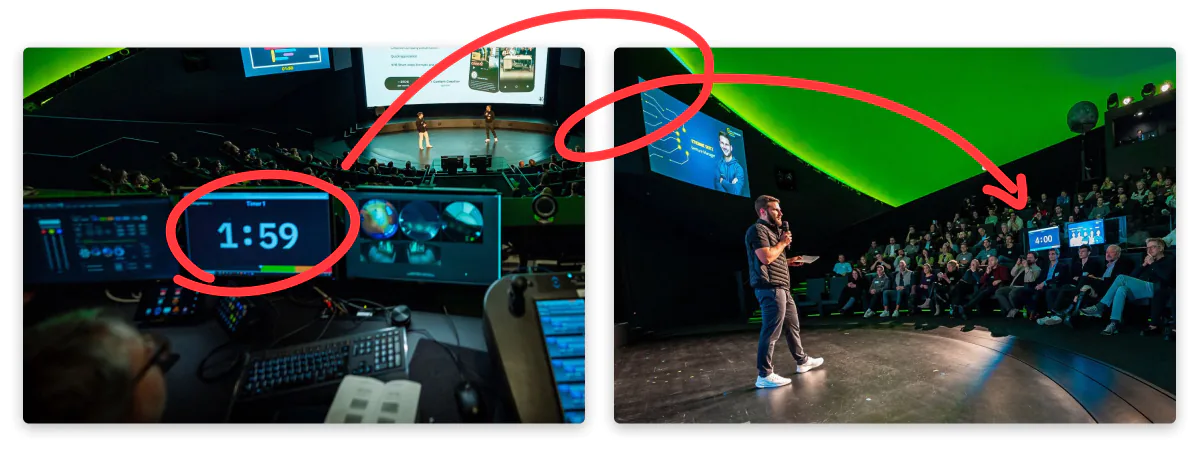
Color-coded wrap-up warnings help speakers gauge time at a glance. Stagetimer uses a progress bar that shifts from green to yellow to red as time runs out — and counts up in red to show exactly how much overtime has passed. You can also add chimes that play at specific times, or make the timer flash to grab attention.
For speakers who habitually run long, Stagetimer’s Time Warp feature can help. Set the timer to show 10 minutes while actually running for 8 — the display counts down 25% faster, gently pushing the speaker to finish on time without them knowing their slot was shortened.
Need to send a direct cue? Use Messages to display “Wrap it up” or “Time’s up” right on the confidence monitor. Messages can flash or take over the full screen for emphasis — useful when a speaker is deep in their flow and not watching the clock.
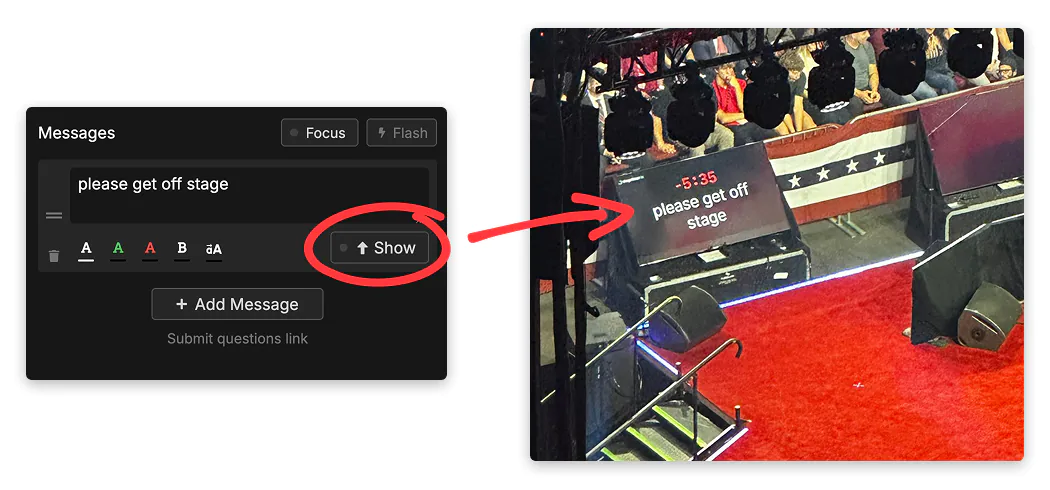
Test the timer’s visibility from the speaker’s position before the event. It should be easy to read but not distract the audience. For larger venues, ensure the display is big enough to see from across the stage.
For virtual or hybrid events, position the timer near other on-screen elements so presenters can monitor everything at a glance. Remote control lets your production team adjust timers or send messages without interrupting. Paul Swinton, Production Director at Vive Event Production, notes:
We love stagetimer.io… it has really helped us handle some large and complex virtual events with many remote presenters joining from all over the world — all kept to time perfectly with ease!
For more on virtual setups, see the online presentation timer use case.
Establish Overrun Protocols
Even with timers, speakers sometimes lose track. Plan your interventions in advance and share them during the pre-event briefing so nobody is caught off guard.
Non-verbal signals work well in different contexts:
- Color-coded cards: Yellow for 5 minutes remaining, red when time is up
- Large signs: For bigger venues, use 3×3-foot signs with clear markers — “10”, “5”, “2 minutes”, “STOP”
- Physical proximity: The moderator moves visibly toward the speaker as time runs out, ready to step in at a natural pause
Set a firm cut-off policy and empower your moderator to enforce it. One approach: step on stage with a microphone to announce that the speaker has 30 seconds to finish their final point. If warnings are ignored, leading the audience in applause ends the session gracefully without confrontation.
For virtual events, you can automate cut-offs by muting microphones when time expires. Build buffer time into your schedule — longer breaks or transition periods of 15–30 minutes absorb minor overruns without derailing the day.
Stagetimer’s Over/Under indicator helps you track delays across your entire rundown. If an early speaker runs 3 minutes long, you’ll see it immediately and can adjust — shorten a break, trim a later segment, or accept the delay knowing the buffer will absorb it.
Putting It Together
Preventing overruns comes down to preparation and visibility:
- Set precise expectations with exact times, not just durations
- Help speakers structure realistic content with timed rehearsals
- Give them a clear timer to watch throughout
- Have a documented plan for when things go long
Your audience stays happy, your schedule stays intact, and your speakers know exactly where they stand.